
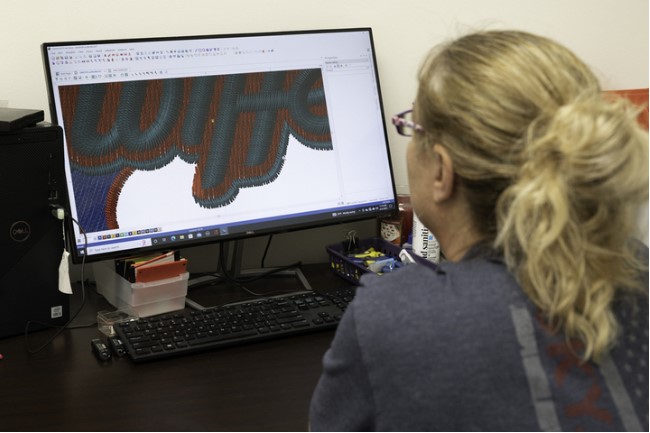
If you’re working with Janome embroidery machines, getting your designs into the right format is crucial and that’s where JPG to JAN Embroidery Conversion comes in. In the very first step of creating a flawless embroidery design, converting a simple JPG image into a JAN stitch file determines how clean, smooth, and professional your final embroidery will look. As we move into 2026, embroidery tools and digitizing techniques have evolved, making it easier but also more important to choose the right conversion method.
In this updated guide, we’ll break down the best tools, methods, and tips for JPG to JAN conversion so you can get stitch-perfect results every time.
What Is JPG to JAN Embroidery Conversion?
JPG to JAN embroidery conversion is the process of turning a raster image (JPG) into a Janome-compatible embroidery file (JAN). Unlike images, embroidery files don’t use pixels they rely on stitch data such as stitch direction, density, underlay, and sequencing.
That means:
- You cannot simply rename a JPG to JAN
- The design must be digitized properly
- Stitch logic must match Janome machine requirements
Without proper conversion, designs may stitch poorly or not run at all.
Why JAN File Format Is Important for Janome Machines
Janome machines are known for precision and smooth stitching—but only when they receive the correct file format.
Benefits of Using JAN Files
- Optimized stitch commands for Janome machines
- Accurate color sequencing
- Better stitch balance
- Reduced thread breaks
Using the correct JAN file ensures your machine performs exactly as designed.
Why JPG Images Need Special Handling
JPG files are raster images made of pixels. Embroidery machines don’t understand pixels—they understand stitches.
Challenges with JPG Files
- Pixelation when enlarged
- No stitch data
- Color blending issues
- Unclear edges
That’s why JPG images must be manually or professionally digitized before conversion.
Best Tools for JPG to JAN Embroidery Conversion (2026)
Here’s an updated look at the most reliable tools and methods available this year.
1. Professional Embroidery Digitizing Services
Professional digitizing remains the most accurate and reliable method for JPG to JAN embroidery conversion.
Why Professionals Are the Best Choice
- Manual stitch planning
- Fabric-based stitch adjustments
- Optimized underlay and density
- Clean outlines and fills
This option is ideal for logos, detailed artwork, and commercial embroidery.
2. Janome Digitizer Software
Janome’s own digitizing software offers decent conversion tools for users who want hands-on control.
Pros
- Designed specifically for Janome machines
- Good compatibility with JAN format
- Allows stitch editing
Cons
- Steep learning curve
Best suited for experienced users who want full control.
3. Wilcom Embroidery Studio (JAN Support)
Wilcom remains a powerhouse in embroidery digitizing and supports JAN exports.
Key Features
- Advanced auto and manual digitizing
- Professional stitch controls
- High-quality conversion options
Downside
- Expensive
- Requires training to master
Ideal for embroidery businesses with high production demands.
4. Hatch Embroidery Software
Hatch is a user-friendly option derived from Wilcom technology.
Why People Like Hatch
- Easier learning curve
- Good auto-digitizing tools
- JAN export support
However, complex designs still require manual editing for best results.
5. Online Auto Conversion Tools (Use with Caution)
Some online tools claim to convert JPG to JAN instantly.
Limitations
- No fabric consideration
- Poor stitch flow
- Excessive stitch counts
- Limited design control
These tools may work for very simple designs but often produce subpar results.
Professional vs Auto JPG to JAN Conversion
Auto Conversion
- Fast
- Low cost
- Limited quality
- Often needs rework
Professional Conversion
- Human digitizing expertise
- Fabric-optimized stitches
- Clean, production-ready files
- Consistent results
If quality matters, professional conversion wins every time.
Key Factors That Affect Conversion Quality
To get the best results, these factors matter most:
- Image quality: High-resolution JPGs work better
- Design complexity: More detail requires manual digitizing
- Final size: Small designs need simplified stitches
- Fabric type: Hats, polos, towels all stitch differently
- Machine speed: Stitch logic must match machine capabilities
Ignoring these can lead to embroidery issues.
Common Mistakes to Avoid
Avoid these frequent errors when converting JPG to JAN:
- Using low-resolution images
- Overloading small designs with details
- Relying entirely on auto-digitizing
- Ignoring stitch direction
- Not testing the file before production
A little preparation saves a lot of frustration.
JPG to JAN Conversion for Logos
Logos are one of the most common conversion requests and also the most demanding.
What Makes Logo Conversion Tricky
- Small text
- Sharp corners
- Multiple colors
- Brand accuracy requirements
Professional digitizing ensures logos stitch cleanly and consistently across garments.
Best Practices for Clean JAN Stitch Files
Follow these tips for top-quality results:
- Simplify artwork before digitizing
- Choose proper stitch types
- Adjust density based on fabric
- Use underlay stitches correctly
- Always test stitch the design
These practices ensure smooth embroidery runs.
Is JPG to JAN Conversion Worth It in 2026?
Absolutely. Custom embroidery continues to grow in demand, and Janome machines remain popular for both home and business use. High-quality JAN files allow you to:
- Expand product offerings
- Maintain consistent quality
- Reduce machine downtime
- Increase customer satisfaction
Good conversion is an investment not a cost.
Future Trends in Embroidery Conversion
In 2026 and beyond, expect:
- Smarter AI-assisted digitizing
- Better stitch simulation previews
- Faster turnaround times
- More hybrid auto/manual tools
Still, human expertise remains essential for premium embroidery.
Final Thoughts
Choosing the right tools for JPG to JAN Embroidery Conversion can make or break your embroidery results. While software and auto tools can help with simple designs, professional digitizing delivers the cleanest, most reliable stitch files especially for logos and detailed artwork.
For high-quality JAN files that stitch smoothly on Janome machines and save you time, thread, and frustration, many embroiderers rely on the expertise and consistency provided by Digitizing Buddy.
What Makes a Good IVF Clinic in Bangalore? Key Factors to Know
Choosing the right IVF clinic is one of the most important decisions for couples strugglin…

Why ABQ Realtors Are Seeing High Demand in the Metro Area
The Albuquerque metro area has experienced a noticeable surge in housing activity over the …